Product · Sales

Sales, With the First Draft Done.

Campaigns, prospects and deals in one place. Agents read the numbers and draft the next campaign. Launching it is always a person’s call.

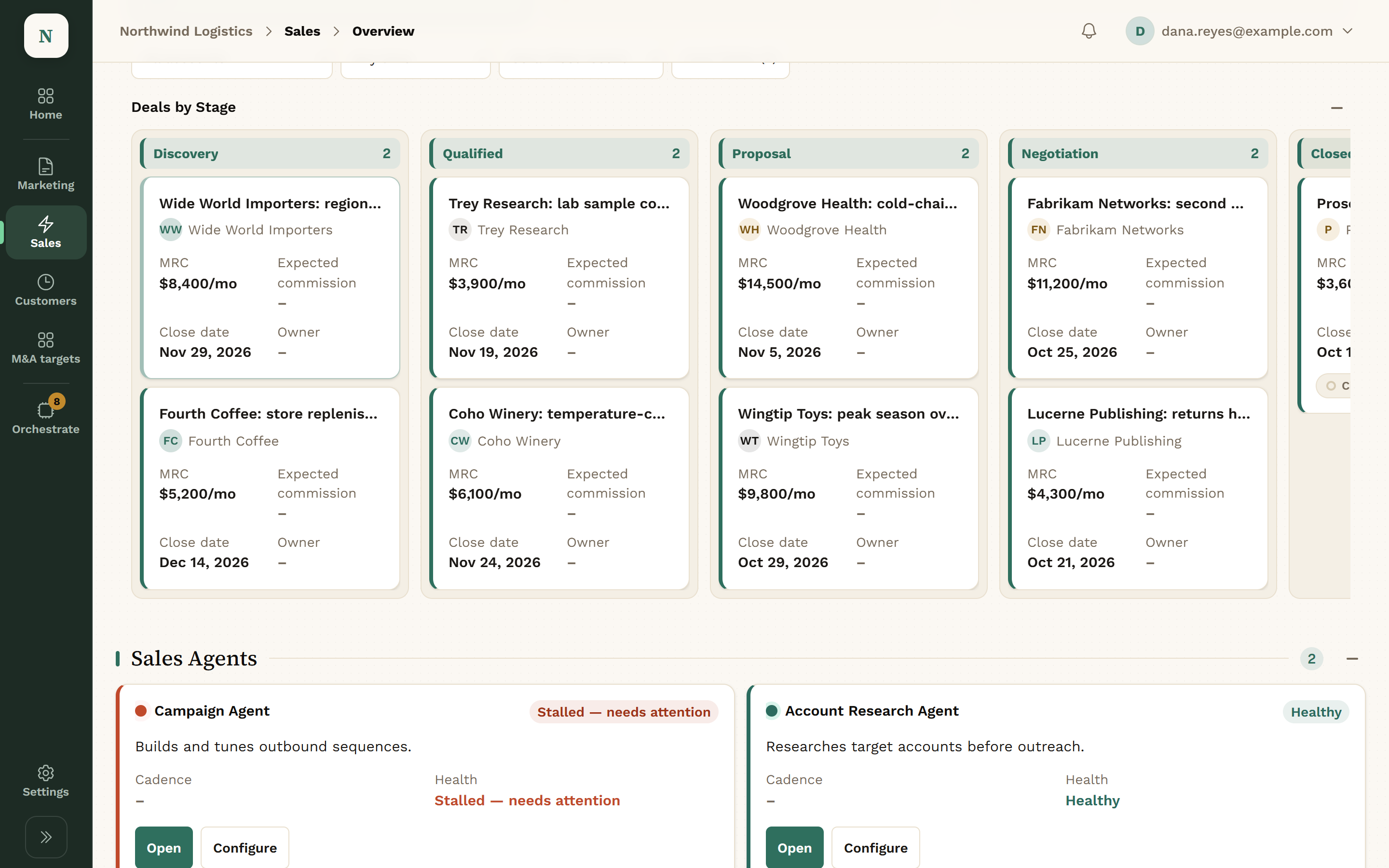
Deals by Stage: HubSpot deals in the Discovery, Qualified, Proposal and Negotiation columns, such as Wide World Importers, Trey Research, Woodgrove Health and Fabrikam Networks, each with its monthly amount and close date, above the Sales Agents.
A real screen from Konsil. The company and people are fictional.View full screen

Example: From Draft to Launched Campaign.

  1. An Agent Drafts the Campaign

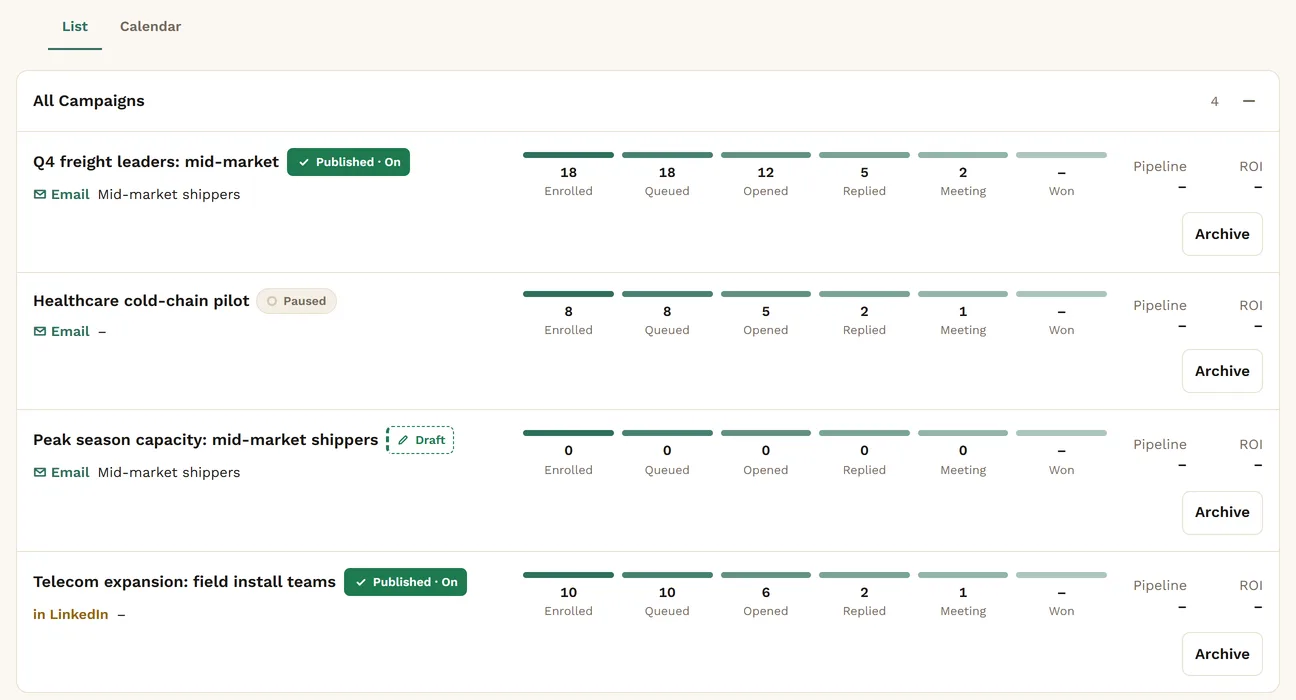
    Ask for a campaign. The agent files the list, the sequence and the copy as a draft, with any compliance notes attached.

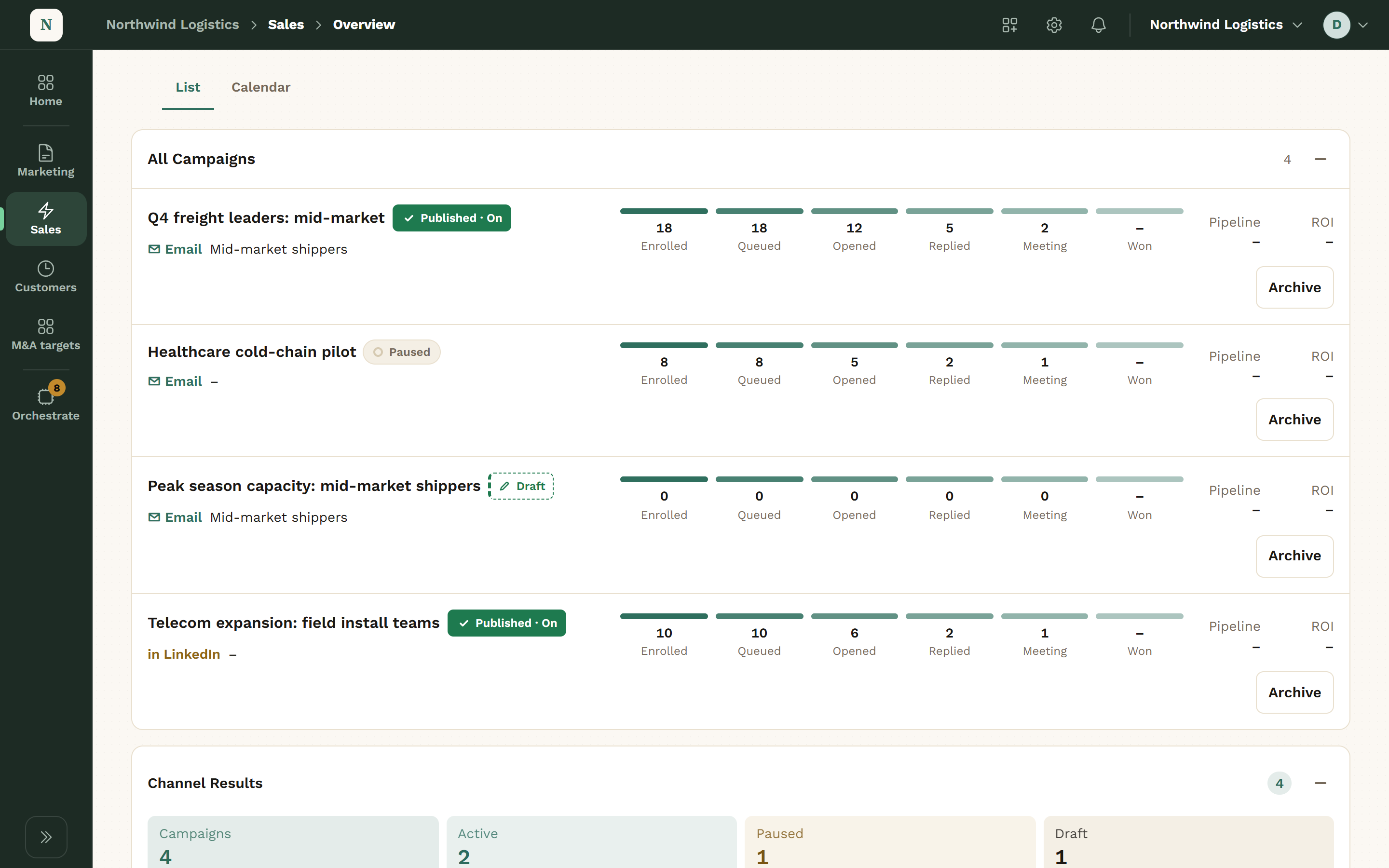
    The All Campaigns list in Sales: two published campaigns and a paused one with their enrolled, queued, opened, replied and meeting counts, and the new campaign Peak season capacity: mid-market shippers marked Draft, with nothing enrolled yet.
    Sales: the new campaign, still a draft.View full screen
  2. You Read It & Launch It

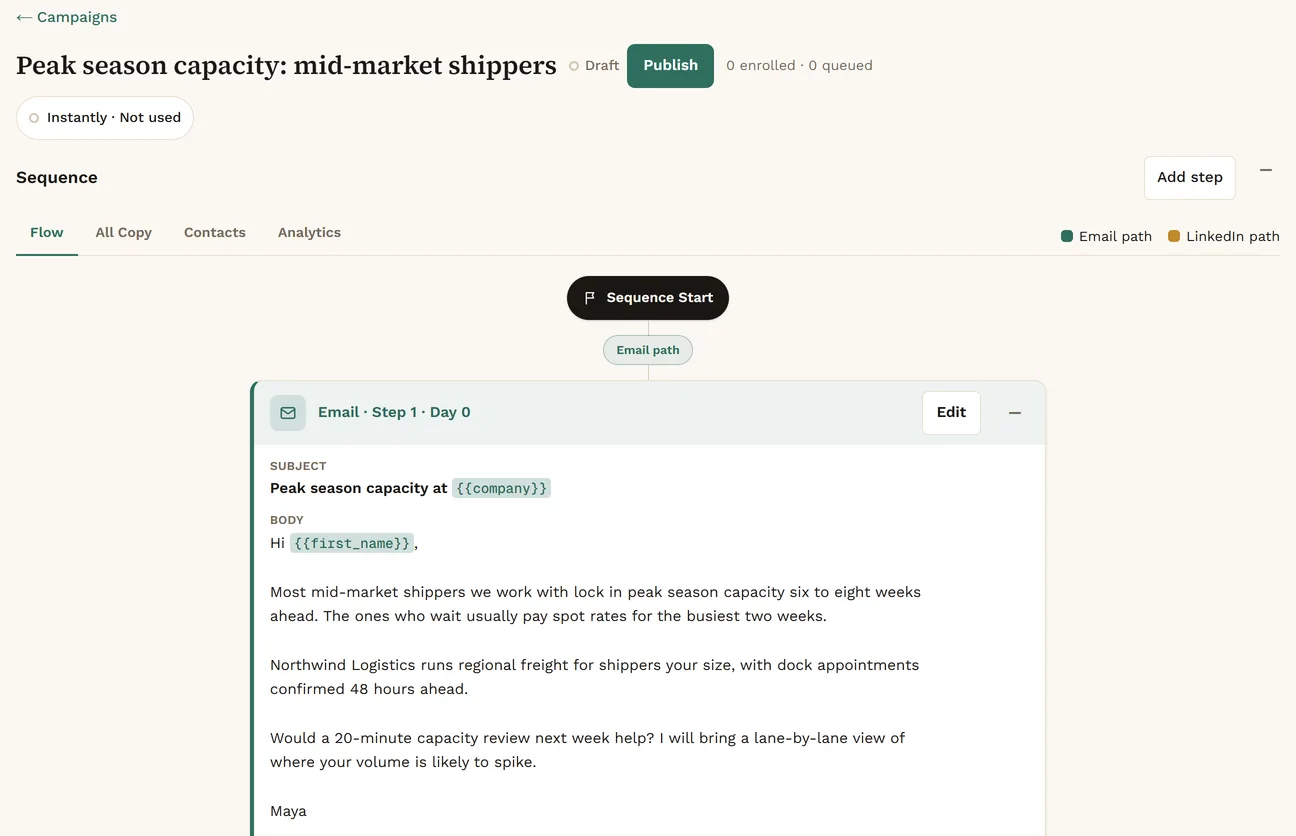
    Suppression and compliance checks run first. Then a person launches it from the console. Agents have no launch or send tool.

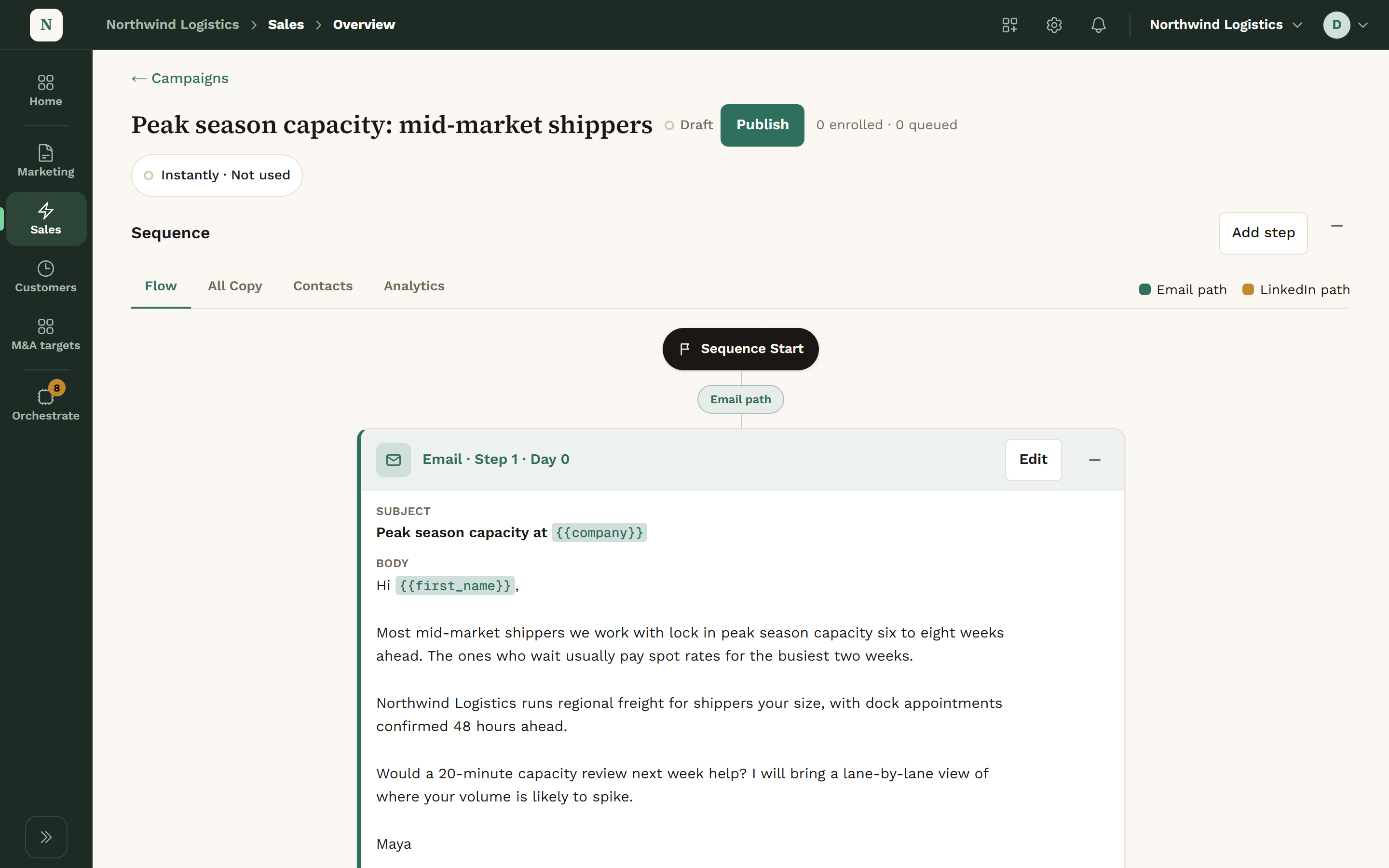
    The draft campaign Peak season capacity: mid-market shippers opened: Draft beside a Publish button, nothing enrolled or queued, and the first email of its sequence written out in full, subject and body, signed Maya.
    Sales: read the draft, then publish it.View full screen
  3. Results Sync In

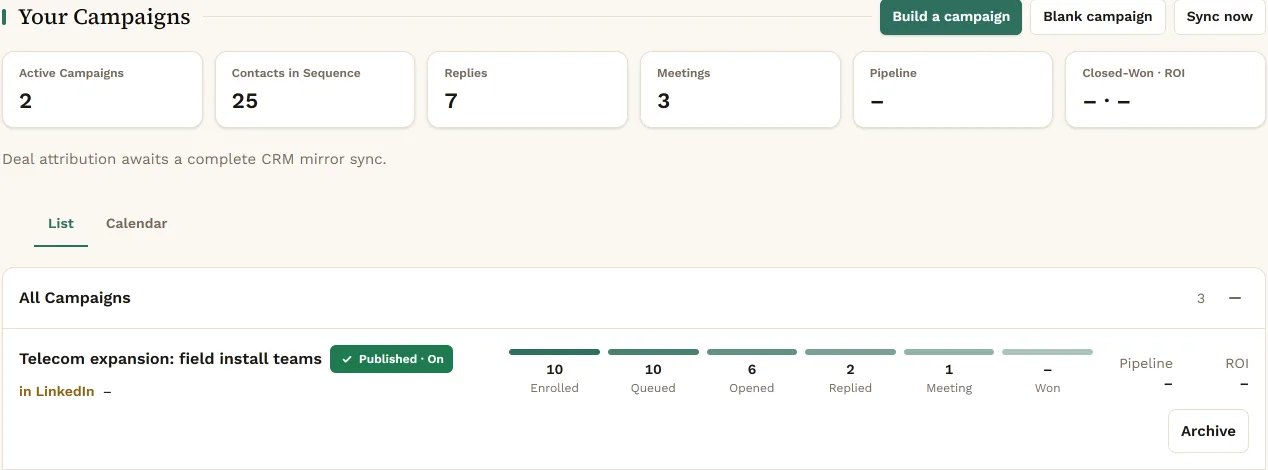
    Instantly and HeyReach results sync every six hours: enrolled, opened, replied and meetings, campaign by campaign.

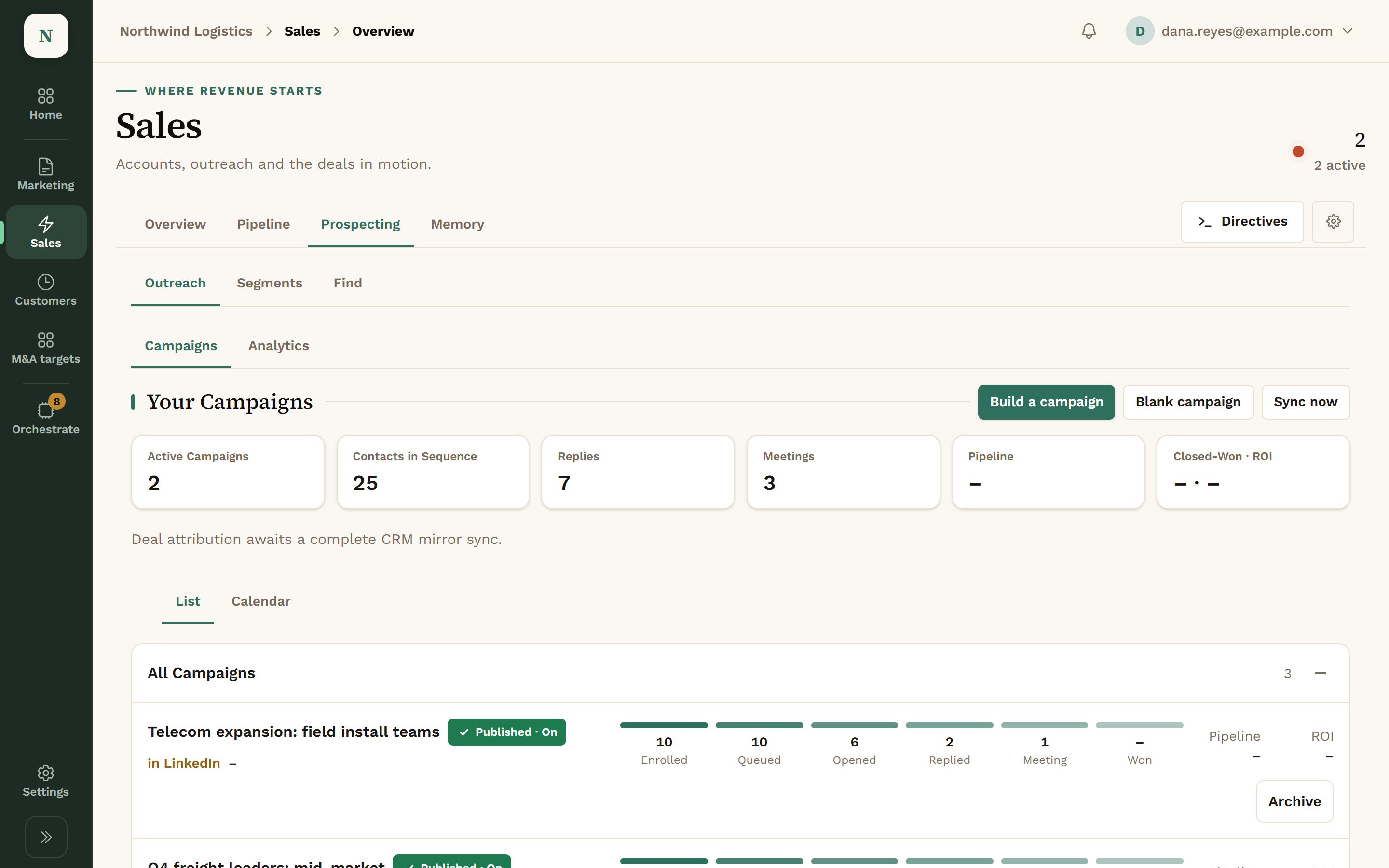
    The Sales area in Konsil: Your Campaigns with tiles for active campaigns, contacts in sequence, replies and meetings, and a campaign called Telecom expansion: field install teams with its enrolled, opened, replied and meeting counts.
    Sales: campaigns and how they’re doing.View full screen
  4. An Agent Suggests a Better Step

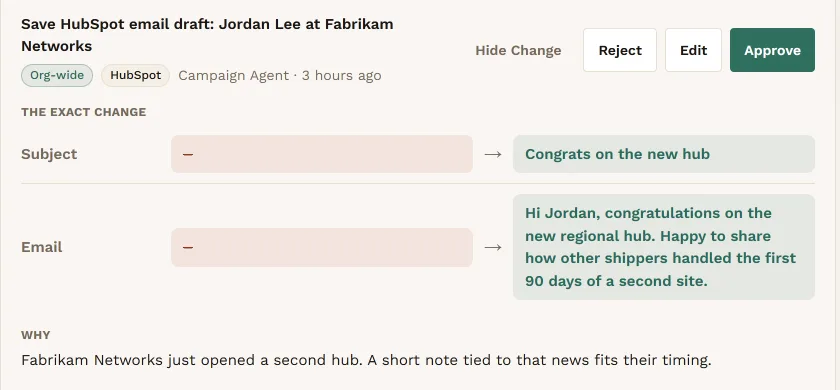
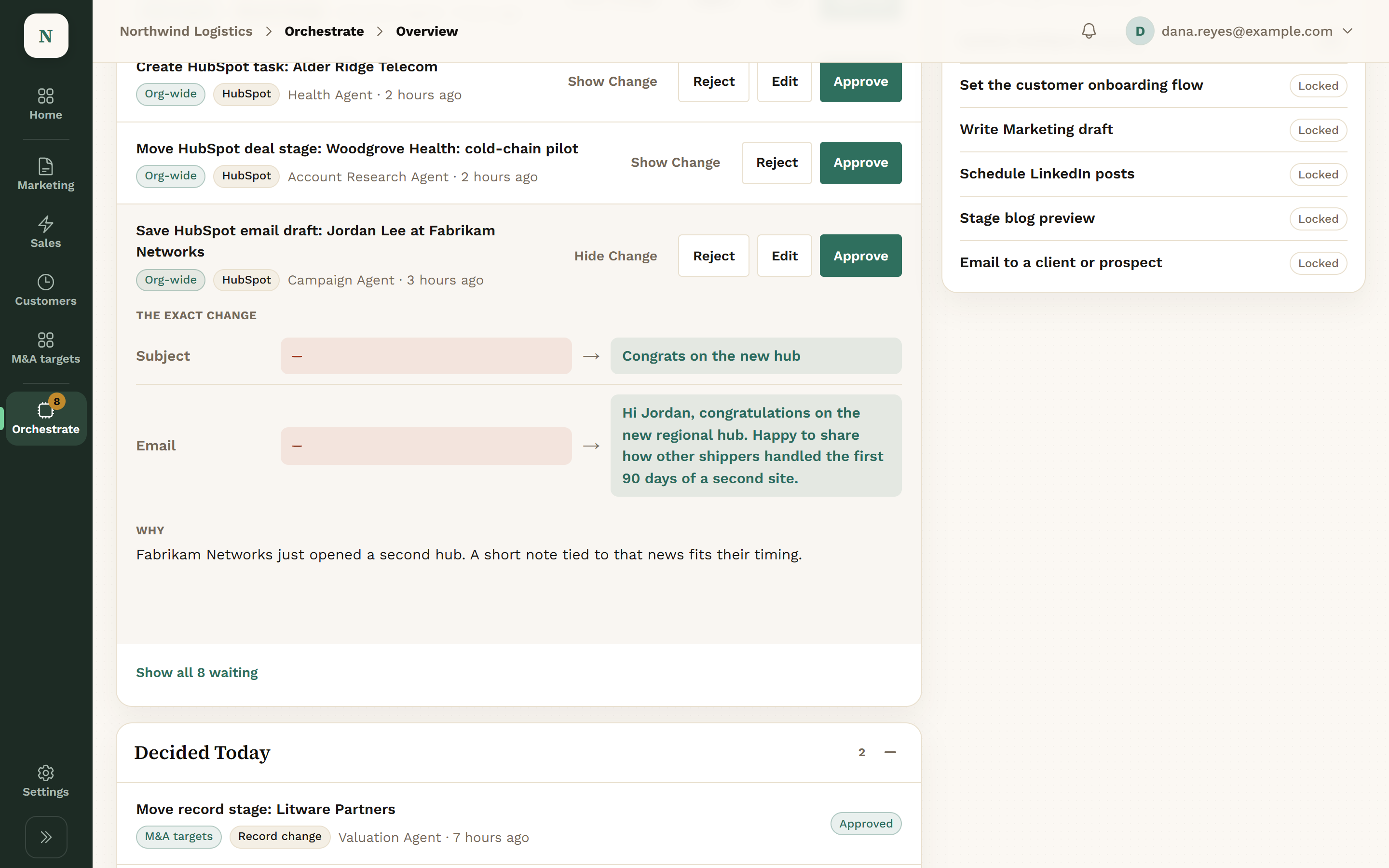
    When a step underperforms, an agent proposes new copy. You see old and new side by side, then Approve, Edit or Reject.

    A proposal from the Campaign Agent to save a HubSpot email draft for Jordan Lee at Fabrikam Networks: the new subject, Congrats on the new hub, and the new email body beside empty old values, with the reason that Fabrikam just opened a second hub.
    A proposed email draft: the exact change, and why.View full screen

The Sales Screens.

Sales has four tabs: Overview, Pipeline, Prospecting and Memory.

Deals by Stage

The Pipeline tab shows your HubSpot deals by stage, with your own pipelines and stage names.

  • Your pipelines, your stage names
  • Agents propose stage moves for a person to approve
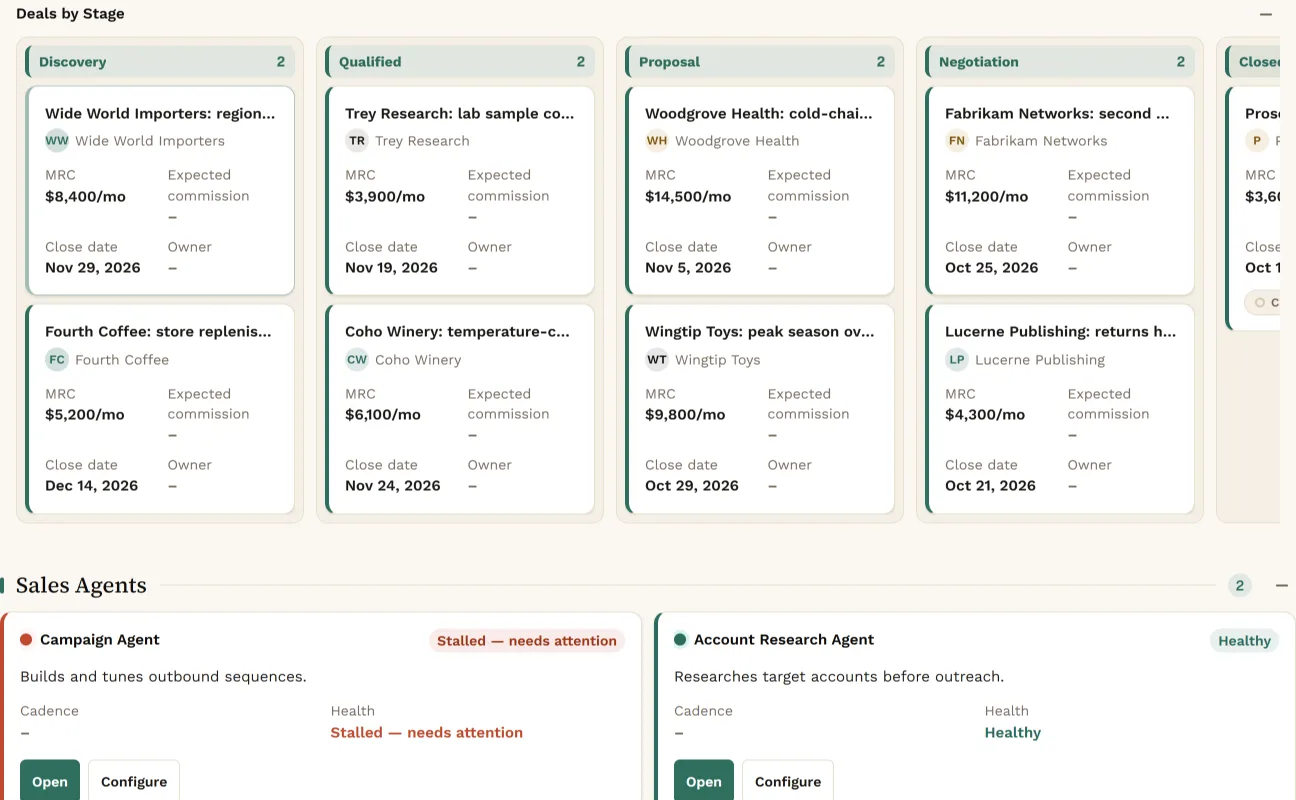
Deals by Stage: HubSpot deals in the Discovery, Qualified, Proposal and Negotiation columns, such as Wide World Importers, Trey Research, Woodgrove Health and Fabrikam Networks, each with its monthly amount and close date, above the Sales Agents.
Sales: deals by stage.View full screen

Build the List

Prospecting has three lenses: Outreach, Segments and Find. Build a segment, enrich the accounts in it, and see which ones still need work.
  • Views for needs enrichment, in outreach and replied
  • Enrichment arrives as a proposal
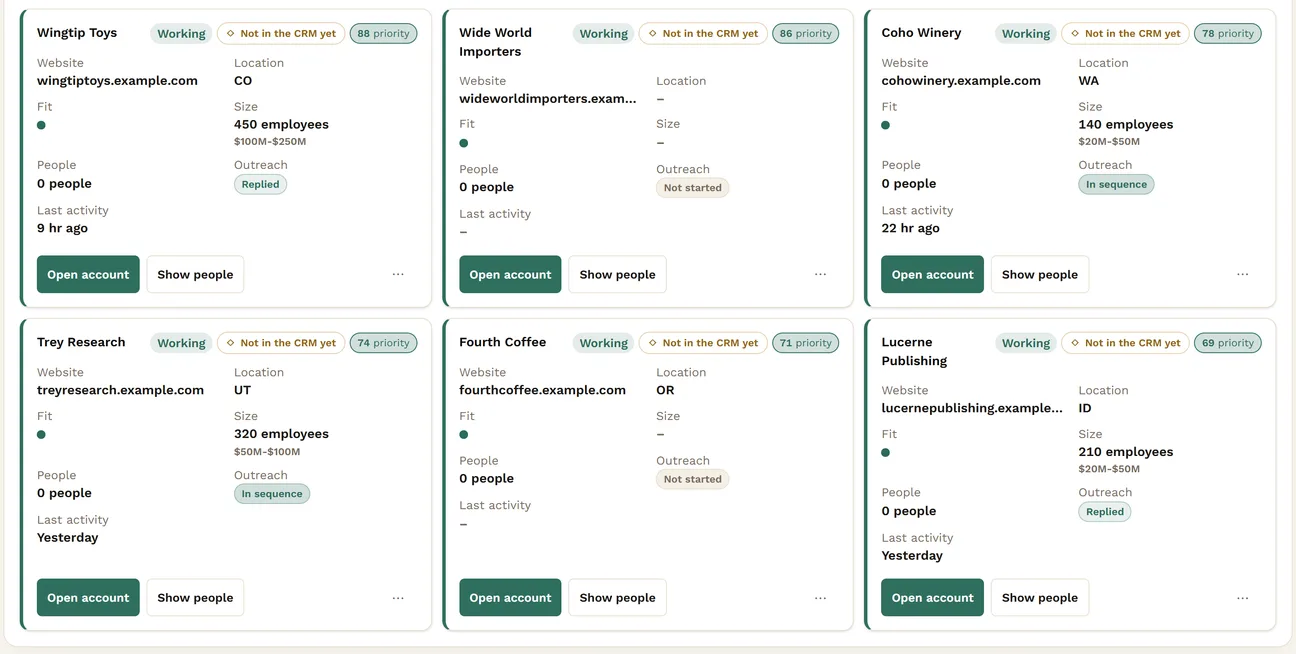
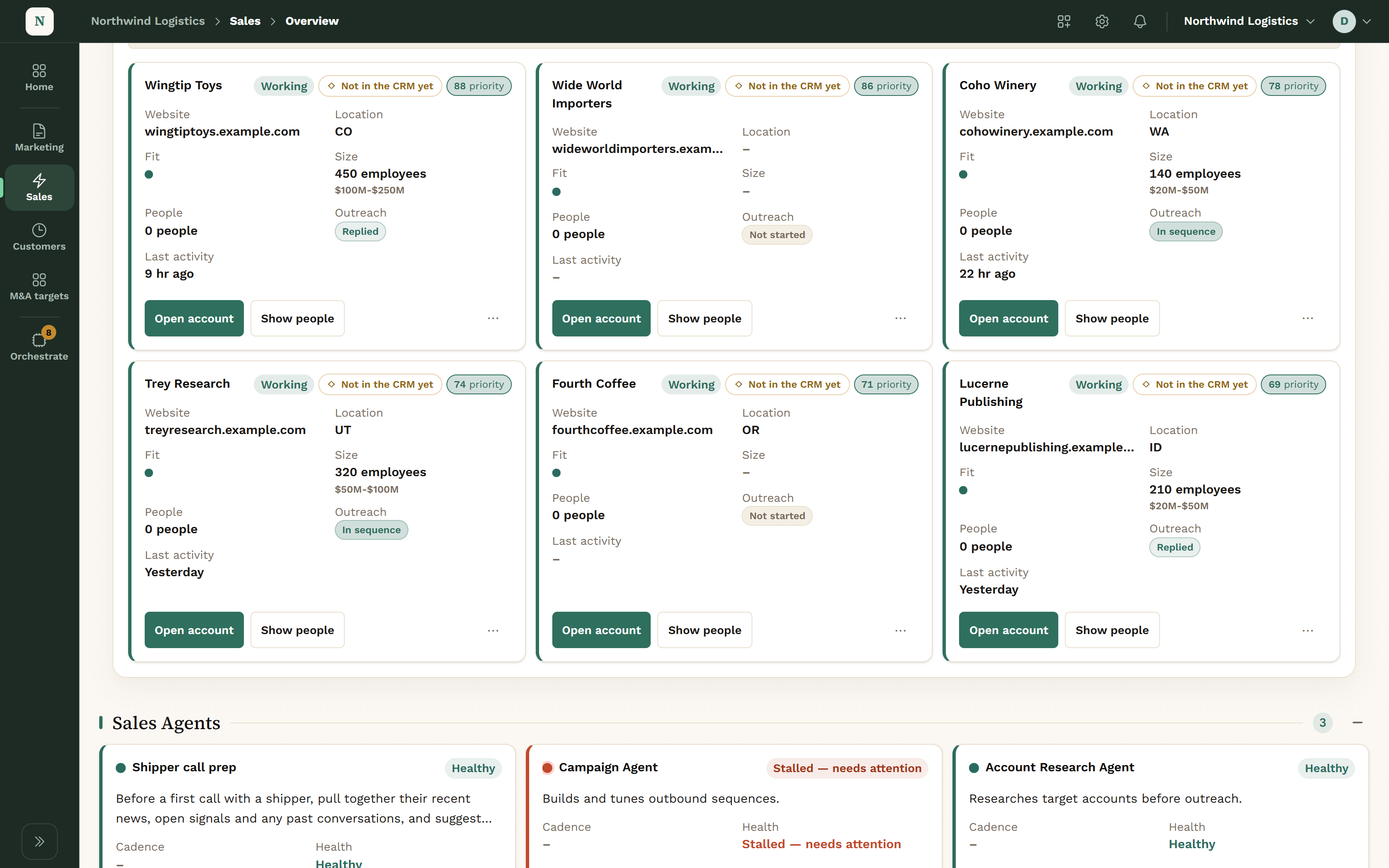
Six account cards in a mid-market shippers segment, each with its website, size, priority and outreach status: Wingtip Toys and Lucerne Publishing replied, Coho Winery and Trey Research in sequence, Wide World Importers and Fourth Coffee not started.
Sales: every account in the segment, and where it stands.View full screen

Ready for Every Call

Overview lists today’s calls. Each one gets a brief assembled from the account’s record and recent activity. After the call, the follow-up is drafted for you to send.

  • A brief for every call
  • Follow-ups drafted, never sent by Konsil

A Day in Sales.

  1. Morning
    You

    Open Overview: today’s calls, new signals and anything waiting on you.

    Your agents

    Overnight, campaign results synced and new signals were matched to accounts.

  2. Before a call
    You

    Read the call brief.

    Your agents

    The brief is assembled from the account record, past calls and campaign activity.

  3. Midday
    You

    Read a drafted campaign. Launch it, or send it back.

    Your agents

    An agent drafted the list, the sequence and the copy, with compliance notes.

  4. Afternoon
    You

    Approve, Edit or Reject proposed copy changes and HubSpot tasks.

    Your agents

    Agents read reply rates and proposed changes to the weakest steps.

  5. After a call
    You

    Edit the drafted follow-up and send it yourself.

    Your agents

    The follow-up is drafted from the call. Konsil has no way to send it.

What Sales Tracks.

Campaigns

Email and LinkedIn campaigns, synced from Instantly and HeyReach.

Fields
  • Channel
  • Enrolled
  • Opened
  • Replied
  • Meetings
States
  • Draft
  • Published · Off
  • Published · On
  • Scheduled
  • Paused
  • Completed

Target Accounts

The accounts you are working, from first find to open opportunity.

Status
  • Active
  • Snoozed
  • Disqualified
  • Converted
Funnel
  • Sourced
  • On the list
  • Enriched
  • Contacted
  • Replied
  • Open opportunity

Deals

Read from HubSpot, with your own pipelines and stage names. Konsil does not keep a second copy of the truth.

What Agents Can Do in Sales.

Reads

Agents look. Nothing changes.

  • Campaigns, sequences and results
  • Audiences and segments
  • HubSpot deals
  • The daily sales brief

Proposes

Agents draft. It waits in the Review queue.

  • A whole campaign, as a draft
  • Copy changes to a live sequence
  • HubSpot tasks, notes and deal stage moves
  • Enrichment values for accounts

Waits for a Person

None of this happens without Approve.

  • Launching a campaign
  • Moving a HubSpot deal stage
  • Any email to a prospect
  • The post-call follow-up, which you send

HubSpot tasks, notes and property updates wait for a person too, unless you turn on auto-approve for them. It is off until you do. One agent action never needs review because it can only reduce outreach: taking a contact out of a campaign.

What Sales Connects To.

HubSpotDeals, pipelines, tasks and notes.reads · writes after approval
InstantlyEmail campaigns and their results.syncs
HeyReachLinkedIn campaigns and their results.syncs
GranolaCall notes for briefs and follow-ups.reads

Product names belong to their owners. Konsil is not affiliated with or endorsed by them.

Questions About Sales.

Can an agent email our prospects?

No. Agents draft campaigns and copy. A person launches every campaign, and agents have no send tool.

Do we have to leave Instantly or HeyReach?

No. Campaigns keep running there. Konsil syncs them in and drafts new ones.

Where do deals live?

In HubSpot. Konsil reads your pipelines and stage names and proposes changes into them.

What happens to a draft that fails a compliance check?

It still lands, labelled with the finding, so a person can judge it.

Get Early Access.

We set up each company by hand, so places open a few at a time.
Get early access